How to Use a Budget Planner Without Tracking Every Dollar
Okay, be honest with me for a second, because I want you to count them properly. How many things are you supposed to be doing right now?
There’s the thing at work you keep sliding into tomorrow, and somebody’s birthday you’ve known about for three weeks, and the laundry that’s been sitting in the machine since yesterday and is definitely going to need doing again, and two texts you haven’t answered, because answering them properly requires a version of you that has slept. Oh, and a dentist you were supposed to call in June.
And then somewhere underneath all of that there’s a budget planner. The nice one, the one you bought with very good intentions, which is currently sitting on a shelf with a blank first page looking quietly disappointed in you.
I bought one too, so I promise I’m not judging. And before we go any further I want you to know something: the reason it’s still blank has very little to do with you, and almost everything to do with what’s printed on page one.
Quick question, and please don’t think about it
What did you buy last month that you wish you hadn’t?
You knew, didn’t you? Straight away, no app, no bank statement, no scrolling… it just turned up in your head fully formed with a tiny wince attached, because that’s how memory works when feelings are involved.
Now tell me what you spent on groceries.
Yeah, nothing, and nobody on earth could answer that off the top of their head, which is exactly why it’s so strange that every budget planner ever made asks you the grocery question and never once asks the first one. Once you notice it, you can’t stop noticing it.
So what I want to show you is a different way of using the planner you already own, and the whole thing rests on one rule: it will never ask you to remember a number you didn’t write down at the time. That’s it, that’s the rule, and everything below grows out of it.
This is you if:
- You own a planner, or an app, or both, and neither has been opened this month
- You have started over in January, and then again in September, more than once
- You know roughly what is in your account and almost nothing about where it went
- Somebody has told you to track your spending for a month and you have quietly decided not to
Why does every planner start with the worst possible task?
Open any planner, or any guide about filling one in, and step one is always some version of the same instruction: go back through your transactions and work out what you’ve been spending.
And look, that advice isn’t wrong! It’s accurate, and if you finished it you’d have real numbers to work with. But as an opening move it’s brutal, because you’re being asked to do admin about a month you cannot change, on a Sunday, for absolutely no reward at the end of it.
So what happens is what always happens, which is that you open the banking app with the best of intentions, scroll for about four minutes, feel considerably worse than when you started, and close it again. And the planner just sits there getting blanker (mine had eleven empty pages at the front, eleven!) while you carry around a low hum of having failed at something you never even got to start.
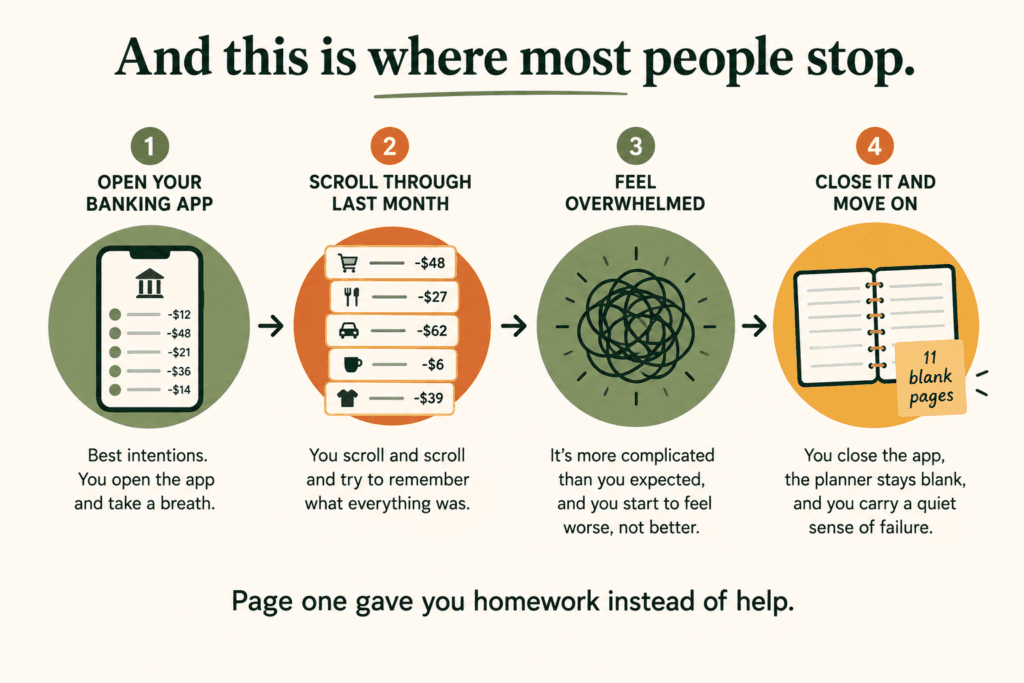
You didn’t quit because something is wrong with you. You quit because page one handed you homework instead of help, and you already have SO many things you’re supposed to be doing that adding a spreadsheet to the pile was never going to end well.
The only thing your planner should ever ask about last month is how you felt about it.
Start here instead: two lists, ninety seconds, no numbers
Before you fill in a single box, write two little lists, three lines each, no dollar amounts, nothing looked up anywhere, all of it straight from memory.
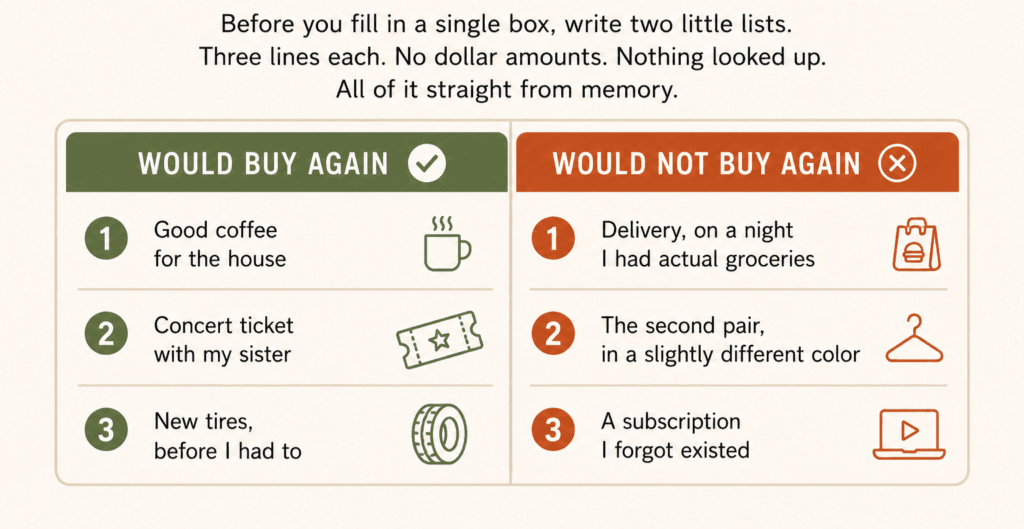
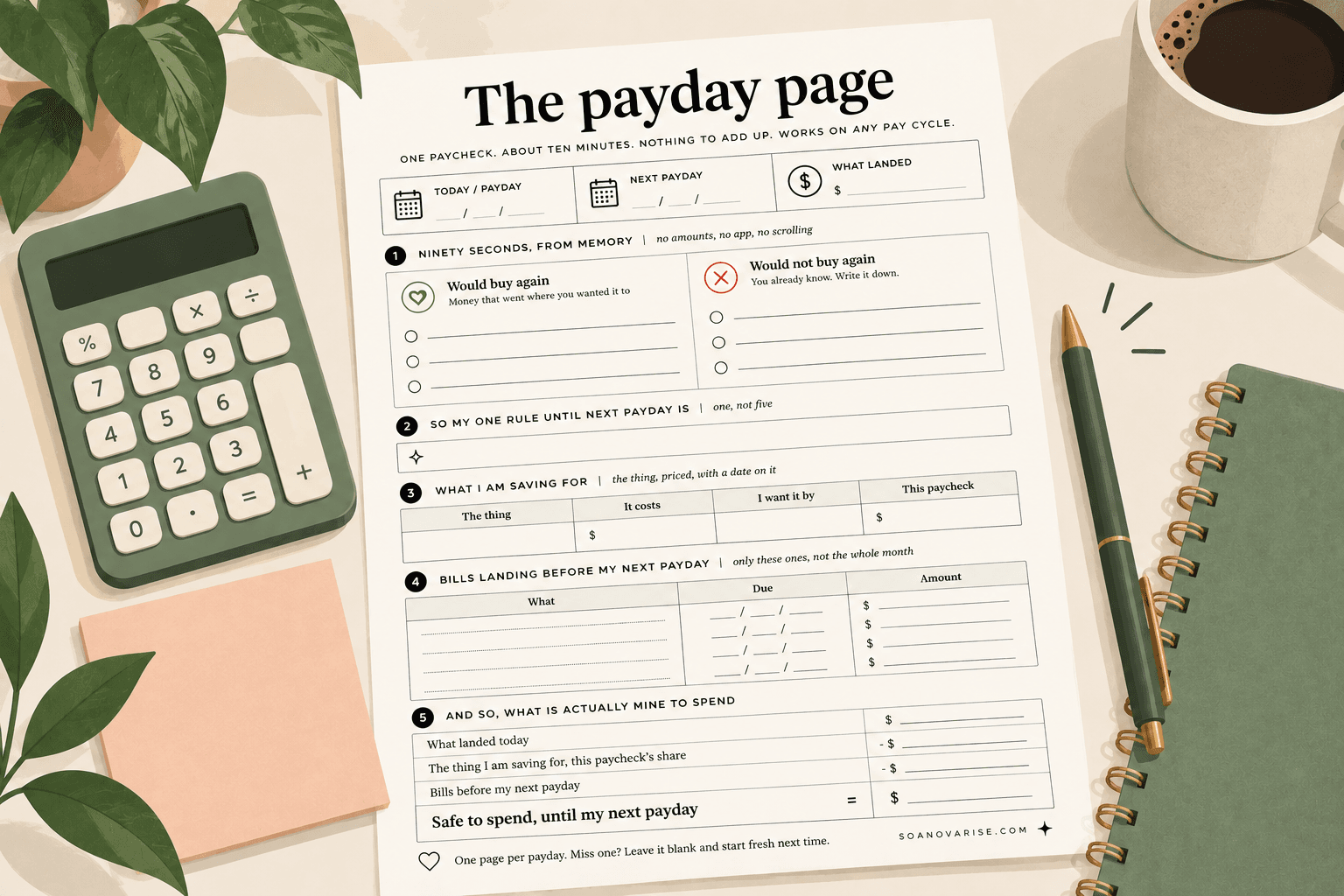
If you would rather not draw the columns out yourself, I made the page. One sheet, free, no email form, print it as many times as you like.
Everyone wants to skip the left column and I’m begging you not to, because it’s quietly doing more work than the right one. A budget’s whole job is to help you spend well, not to help you spend less, and definitely not to make you feel like a disappointment twice a month. If the planner only ever collects your regrets it turns into a punishment log, and nobody in the history of the world has opened a punishment log twice.
The left column is your proof that some of the money went exactly where you wanted it to go. Mine usually has something small and unserious sitting in it, and last time it was a candle (twenty two dollars, no notes, would light again hehe).
Then the right column does something that no percentage rule can do for you, which is turn into the actual rules for your next paycheck, written in your words instead of a finance app’s. Not “reduce food spending,” which means nothing at 9pm. Something you could follow half asleep, like: no delivery on a night there’s food in the fridge.
The bit I’d rather not admit: the first time I did this, two of my three “would not buy again” lines were the same store. Mortifying for about ten seconds, and then weirdly great, because it turned out I didn’t have a budgeting problem so much as one small decision I kept making on repeat, and that is so much easier to fix.
But what about the stuff I don’t even remember buying?
Yeah. That’s the hole in all of this and I’m not going to pretend otherwise, because you can’t regret what you never noticed in the first place. The money that gets away is never the money you remember:
- The thing that renews at $11.99 on a date you have never once looked at
- The trial you swore on your life you’d cancel
- The app you opened twice in March and not since
- The subscription that went up by two dollars and never mentioned it
None of that ever becomes a memory, so none of it is ever going to make either list.
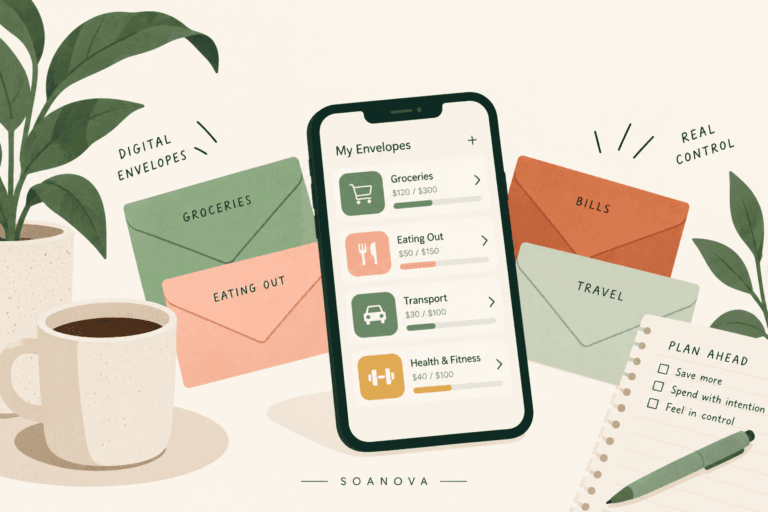
Which is the one job worth handing over to software, and the only reason I’d tell you to download anything at all. Rocket Money connects to your accounts and puts every recurring charge on one screen, and the free tier shows you that list, tracks your upcoming bills and gives you two custom budget categories, which really is all you need for this. Premium runs $7 to $14 a month if you want their team handling the cancellations for you, plus unlimited categories and net worth tracking, but that’s a nice-to-have rather than the point.
Read the list once, move anything you wouldn’t buy again straight into the right column, and you’re done. Two lists finished, and you haven’t added up a single thing.
Put the thing you want at the TOP of the page
Every budget planner is laid out in the same order, with income at the top, then your fixed bills, then variable spending, and then right at the bottom, if there happens to be any room left over, a sad little box labeled “savings.”
Which is backwards! And you already know it’s backwards, because there is never any room left over, there never has been, and there never will be as long as the wanting comes last.
So flip the page. Top line, above rent, above everything else:
The thing you want.
Priced.
With a date on it.
Not “save more,” and not “vacation fund,” but the boots, $180, by November 14. The flight home, $340, by December 1. The date is the whole trick here, because a date quietly turns a wish into division. $180 by November 14 is five paychecks away, which makes it $36 a paycheck, and $36 is a number you can look at and have an opinion about. Wanting boots isn’t a plan, but thirty six dollars is.
And if the math lands on a number you can’t cover, you’ve just found that out in ten seconds instead of six weeks, so you get to move the date or change the thing, and both of those are honest answers.
One thing I will always be annoying about: the internet’s third option is to put it on a card and deal with it later, and I would skip that every single time. It’s the same purchase at a higher price, with the decision moved somewhere you’re not going to look at it. Moving the date is not failing. Paying interest on a pair of boots is.
If naming the thing is the part that stumps you, which happens more than you’d think, that’s worth a whole evening on the couch on its own. I keep a money vision board for exactly this reason, because dividing by five paychecks is so much easier when you’re certain what you’re dividing for.
One paycheck per page, not one month
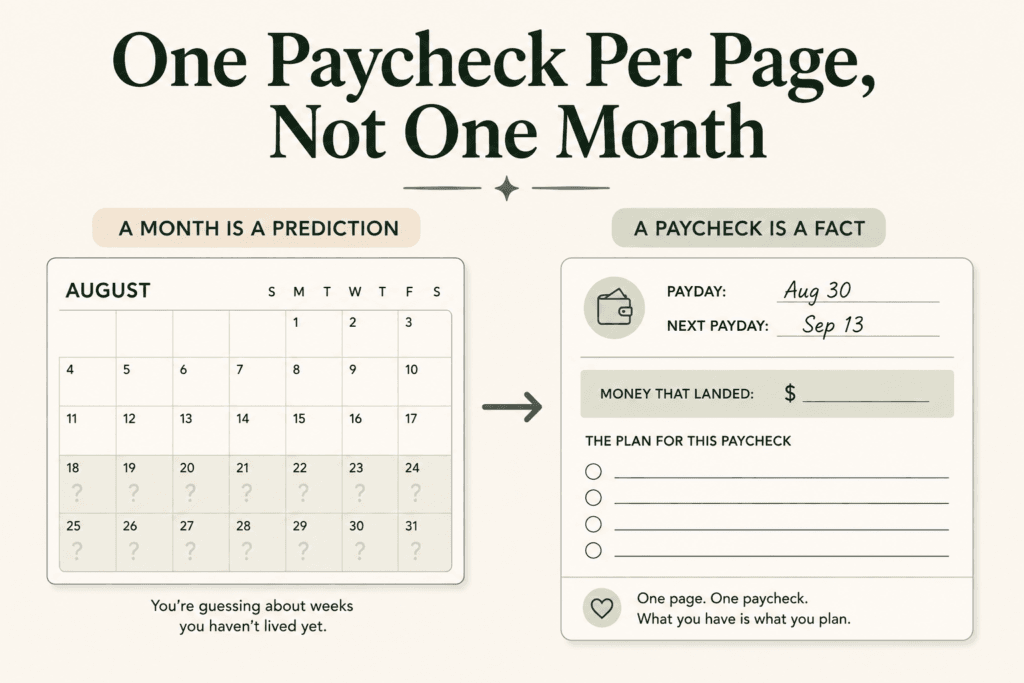
A month is a prediction. A paycheck is a fact.
And the difference between those two things is most of why planners fall apart.
When you sit down on the 1st and plan a whole month, you’re guessing about a week you haven’t lived yet using money that hasn’t turned up yet, And then the guess turns out to be wrong, because guesses are wrong, that’s their entire personality. So the page slowly becomes a record of you being wrong, which is funnily enough right around when everyone stops opening it.
So make the page the size of the money you can already see. You fill it in on payday, it covers you until the next payday, and it never once asks you to predict past that. One page, one paycheck, whatever “paycheck” means for you.
And that last bit matters more than people admit, because we are not all paid the same way and almost every budgeting article on the internet quietly assumes you’re paid every two weeks. So, quickly, find yourself:
- Paid every two weeks? 26 pages a year. Your pay cycle and your bill cycle are different lengths, which does something useful twice a year, and that’s the next section.
- Paid twice a month, usually the 15th and the last day? 24 pages, always the same two dates, and you never get a surprise third check. Your thing to watch is different: whichever of your two checks carries rent is doing far more work than the other one, so plan them as two unequal pages rather than two matching ones.
- Paid weekly? 52 pages is a lot of pages, so use one page per two paydays and write both dates at the top. Four times a year a month will hand you a fifth payday, which is the same happy accident the biweekly lot get, just more often.
- Paid monthly? One page is one month, and honestly you’re the reader this whole article opened on, because when the money arrives once and has to stretch thirty days, week two is exactly where it goes wrong. Your bills line is the most important line on the page. List every single thing due before the next payday, because for you that’s the entire month.
- Paid whenever the work pays? Fill it in the day the money lands, whatever day that turns out to be. This suits you better than it suits anyone, because it never once asks you to forecast.
Two weeks is the one I’ll keep using as the example, because it’s the most common setup in the US, but nothing about the page depends on it.
Switching mine to payday is the single change that stopped me starting over every few months, and I want to be clear that I didn’t get better at money, I just stopped being asked to guess.
One small thing if you’re paid every two weeks: you get 26 checks a year, not 24, because your pay runs in fourteen day cycles and your bills run in months. So twice a year a third payday lands in a month whose rent and phone were already covered by the other two. You don’t need a calendar to find those months, either. Fill in “next payday” at the top of every page and you’ll see one coming two weeks out, which is plenty of notice to decide where it goes instead of watching it disappear.
Which bills land before I get paid again?
This is the other thing paper can’t do for you, because your page only ever holds the bills you remembered, and the ones that get you are never the ones you remembered.
If that’s your particular flavor of chaos then this is the second job worth giving to an app. Quicken Simplifi lines your scheduled bills up against your upcoming pay dates, so you can see what’s already claimed before you decide what’s spendable. Takes about four seconds, and saves the specific horror of a direct debit landing two days before payday.
It’s $3.99 a month billed annually on the current promo, so $47.88 for the year, against a standard rate of $6.99 a month billed annually, and it auto renews at whatever the price happens to be by then. I checked both of those on Quicken’s own site on 28 August 2026, and promo rates move around constantly, so please have a look yourself before you pay for anything.
And that’s the lot, two apps maximum, doing one job each. If you want the fuller comparison with YNAB and Monarch it’s all in the budgeting apps breakdown, but I promise the paper is still doing the deciding here.
Why there’s no 50/30/20 printed anywhere on this page
Almost every planner you can buy has three numbers on the cover: 50 for needs, 30 for wants, 20 for savings. It’s a tidy little rule and it’s completely fine… right up until you try it on an actual household.
The Bureau of Labor Statistics asks American households what they spend every single year and publishes it split into five income groups, so here’s what the four things nobody can opt out of take from each group.
| Share of total spending | Lowest 20% | 2nd 20% | Middle 20% | 4th 20% | Highest 20% |
|---|---|---|---|---|---|
| Housing | 41.0% | 37.6% | 34.8% | 32.0% | 30.2% |
| Transportation | 15.1% | 17.1% | 17.4% | 18.0% | 16.3% |
| Food | 15.6% | 13.7% | 13.8% | 13.2% | 11.2% |
| Healthcare | 10.3% | 9.3% | 9.6% | 8.2% | 6.3% |
| Those four together | 82.0% | 77.7% | 75.6% | 71.4% | 64.0% |
| Everything else | 18.0% | 22.3% | 24.4% | 28.6% | 36.0% |
Read those bottom two rows again, and take your time, because I added them up three separate times before I believed the first column.
Housing, transportation, food and healthcare are not wants, nobody opts out of any of them, and together they take 82 cents out of every dollar that the lowest earning fifth of American households spend. They still take 64 cents at the top! There is no income group in this entire country where those four fit inside 50%.
So when a planner prints 50/30/20 on the cover and then your month refuses to behave, the page was already wrong before you ever picked up a pen. And that matters, because it’s a printed instruction to fail, sold to millions of people who then go home and blame themselves for it. Which is exactly why this planner leaves the categories blank for you to name yourself.
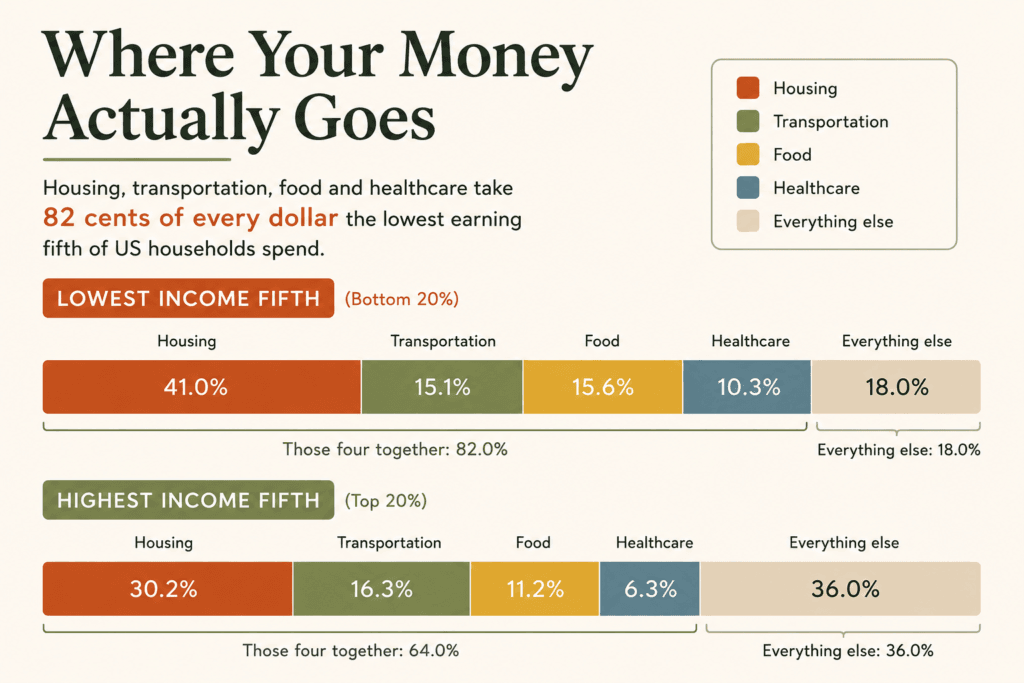
Two caveats though, because I don’t want you quoting a number wrong at a dinner party. These are shares of what households spend rather than what they earn, and 50/30/20 is a rule about take-home pay, so they’re not measuring quite the same thing. They’re also national averages across every household size and situation going, so yours won’t match a column exactly. The point was never the exact figure, it’s that the shape of the rule doesn’t fit the shape of the country.
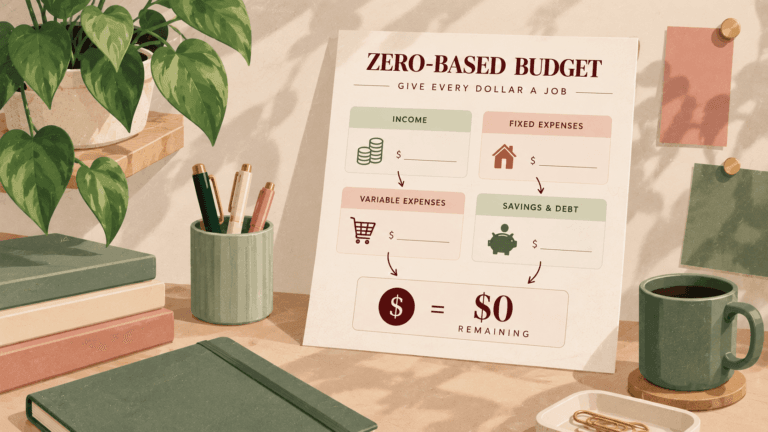
If you want a method for building categories that fit your numbers, the zero-based budgeting walkthrough is the proper setup guide, and it goes deeper on the 50/30/20 comparison. This article is about what happens afterward, when a real month starts having opinions about your plan.
Your ten minutes on payday
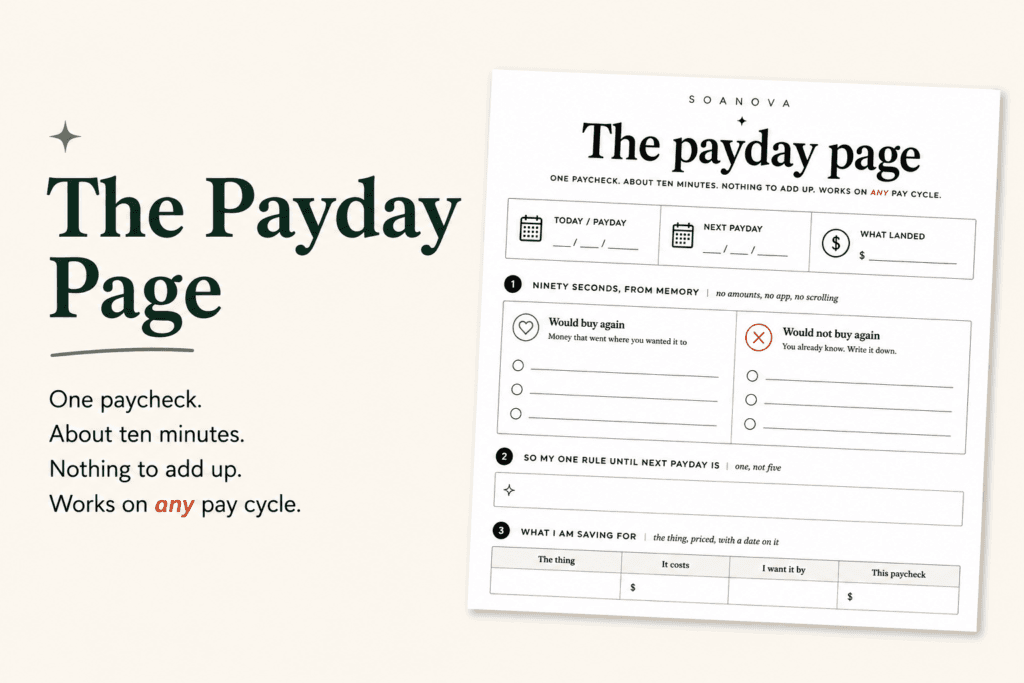
That’s the whole routine, by the way, five steps in the same order every payday forever, and mine takes about seven minutes, which isn’t because I’m fast, it’s because I know where the pen lives.
- Two lists, ninety seconds. Would buy again, would not buy again, three lines each, no amounts.
- Turn the right column into one rule to hold until your next payday. One! Not five, you’ll never keep five.
- The want goes on the top line, priced and dated, and its share comes out first before anything else gets to touch the money.
- List only the bills landing before your next payday, not the whole month, just the ones arriving before more money does.
- Subtract, and look at what’s left, because that number is what you can spend until your next payday without checking anything, which is the entire point of doing any of this.
Ten minutes, twice a month. That’s the real cost of a budget planner that survives contact with your actual life.
And the payday you miss it, because you will
You’ll miss one, everybody misses one, and a payday will go past while you’re busy or ill or simply not emotionally available for money that week, so here’s the rule that matters more than anything else on this page.
You never owe the planner a back-fill.
You don’t reconstruct the two weeks you missed, you don’t dig receipts out of your bag to catch up, and you absolutely do not wait and start fresh in January like it’s a gym membership. You just open it on the next payday and fill in that page, and the blank one stays blank and means nothing whatsoever, because this planner only ever cared about money you hadn’t spent yet, so there’s nothing at all to be behind on.
That isn’t me being kind to you either, it’s how the thing is built. (Although if a blank page still bugs you, write the date in it and put a line straight through, which is weirdly satisfying and takes two seconds hahaha.)
And if missing a payday tends to hurt because there’s no cushion sitting underneath it, that’s a separate and very fixable thing, and how much you actually need in an emergency fund is a smaller number than most people assume.
Questions I get asked about this
So I never track my spending? Ever?
You can! And if you like doing it, it will make you better at all of this. The rule is only ever about the first move. Tracking is accurate, it’s just a rough opening step that costs you effort before it gives you anything back. So start with the two lists, and add tracking later if you want it, rather than because a page told you to.
But I thought a budget was supposed to cover the whole month?
That’s what most of us were taught, and it’s exactly why so many of us bounce straight off it. A month is a guess, so plan the money after it lands instead of before, and you’re suddenly working with facts rather than hoping.
My income is different every month, does this still work?
It works better for you than for almost anyone, because you fill the page in on the day you’re paid using the amount that landed, and no forecasting is required at any point.
Is this just zero-based budgeting?
No! Zero-based budgeting is a method for giving every dollar a job across a month and it’s a good one, whereas this is how you use the planner itself week to week once a method exists, and loads of people quite happily run both.
If you only take one thing from this page: fill it in on payday, never on the 1st, and never about two weeks that have already happened. Everything else here is detail.
Do I need an app at all?
Nope, paper does all the deciding, and software is only worth it for the two things paper can’t do, which are finding the charges you never noticed and showing you what’s due before your next payday.
One last thing
That purchase, the one that turned up in your head within about ten seconds of starting this article with the little wince attached… go and write it down.
That’s line one of your right column, and it’s the first question a planner has ever asked you that you already knew the answer to, which after everything I think you’ll agree is a fairly low bar and yet here we are.
Everything else on that page is just money you haven’t spent yet, and you get to decide what happens to it on payday, in about ten minutes, with a pen. So go and open the nice planner, she’s been waiting.
Sources
- US Bureau of Labor Statistics, Consumer Expenditure Survey: shares of average annual expenditures by income quintile before taxes, 2022. The housing, transportation, food and healthcare shares in the table above. The “those four together” and “everything else” rows are my own arithmetic on those figures.
- US Bureau of Labor Statistics, Consumer Expenditures in 2024. Checked for a newer quintile breakdown. It publishes year-on-year dollar changes by quintile rather than spending shares, so the 2022 share table above is still the most recent published in this form.
- Quicken Simplifi. Pricing checked on Quicken’s own site, 28 August 2026.
- Rocket Money. Free and Premium plan features and pricing, checked August 2026.
- 2027 biweekly pay calendar: calculated for all fourteen possible first-payday cycles, August 2026.
Last checked August 2026. Prices and promotional rates change often, so always confirm on the provider’s own site before you pay for anything.